
Overview
This article explains how to update your vessel's name in SIRE. The vessel name is held against your HVPQ document, so changing it involves editing the HVPQ and republishing.
Please note: administering and editing vessel details is the responsibility of the operator/account holder.
Before you start
You will need:
- An active SIRE Operator account with permission to edit your fleet
- Access to the vessel record you want to update
- The new vessel name as it appears on the vessel's certificate
You can edit the HVPQ either online in your browser or offline using the Desktop Particulars Editor - both methods produce the same result.
Step 1 - Open the vessel details
From your vessel index, locate the vessel you want to update and click the blue arrow to open the vessel details.
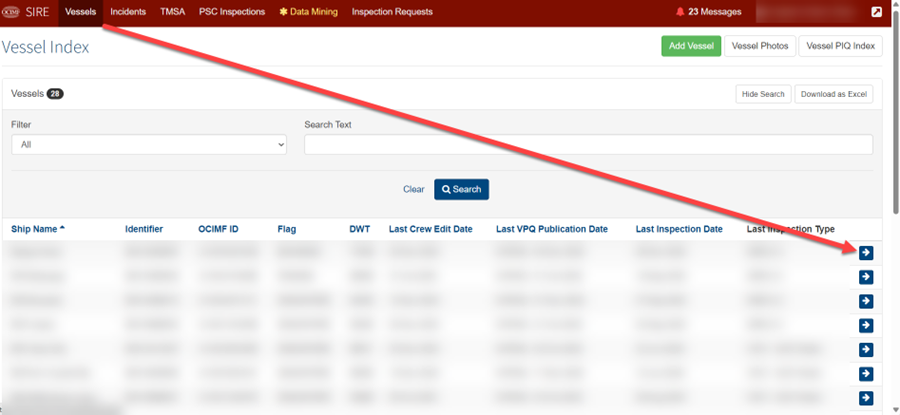
Step 2 - Edit the HVPQ
On the vessel details screen, click Edit HVPQ.

Step 3 - Choose Online or Offline editing
Scroll down to find three sections:
- Edit Online - edit the HVPQ directly in your browser
- Edit Offline - download the Desktop Particulars Editor to edit offline
- Publish - used in Step 5 after your edits are complete
Choose whichever editing method suits you.

Step 4 - Update the vessel name
In the HVPQ editor, open:
Section 1: General -> 1.1.2 Name of ship
Enter the new vessel name exactly as it appears on the Certificate of Registry.

Step 5 - Publish the HVPQ
Publish from the editor or you can also publish by returning back to the HVPQ6 Details page and click Publish in the Publish section.
Once published, your vessel name updates across your account and on all future inspections. The vessel's IMO number remains unchanged - only the displayed name updates.
What happens next
- Your vessel will appear under its new name in the vessel index immediately after publishing
- Future inspection bookings and HVPQ submissions will use the new name
- Historical inspection records and inspections requests already submitted will retain the original name they were submitted under
Related articles
- SIRE Operator - Creating/Updating Vessel Particulars Using The Online Editor
- SIRE Operator - How to Rename a Vessel/Update Flag Details in the Vessel Record
Still need help?
If you encounter an issue during this process, please reply to your support ticket with:
- A description of where the process did not progress as expected
- A screenshot of the screen you are stuck on (if applicable)
Comments
0 comments
Please sign in to leave a comment.